Part of the Puzzle shelf
Sudoku AI game maker
A sudoku AI game maker has to make the grid, the givens and the rule legible before it adds difficulty levels. Sudoku is a grid, a set of givens and a rule that never changes. This shelf has a 4x4 warm-up, a 6x6 grid and the classic 9x9. Play one before you prompt a number puzzle.
What a sudoku shelf has to prove
A sudoku page is a promise about constraint clarity. The player needs to see the grid, the givens and the box boundaries, then place a number without guessing whether the rule changed. The 3 builds here scale the same rule from a four-by-four warm-up to a six-by-six grid and a fixed nine-by-nine classic.
The shelf is deliberately small. It can show whether a cell selection, a number pad and a mistake counter are legible. It cannot show a puzzle generator with difficulty levels, pencil notes or a hint system. The 9x9 build uses one fixed puzzle, not an endless supply. Those limits are part of the test.
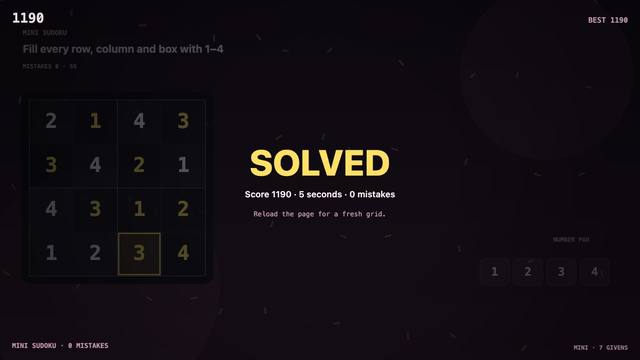
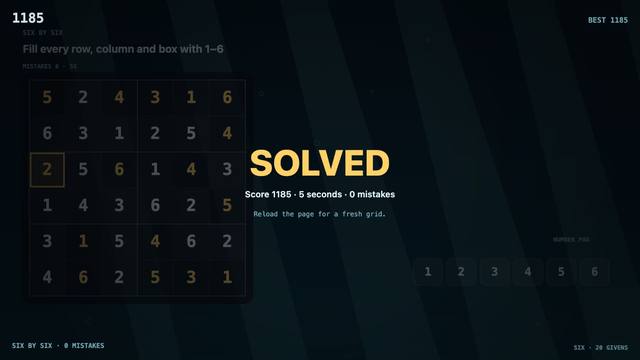
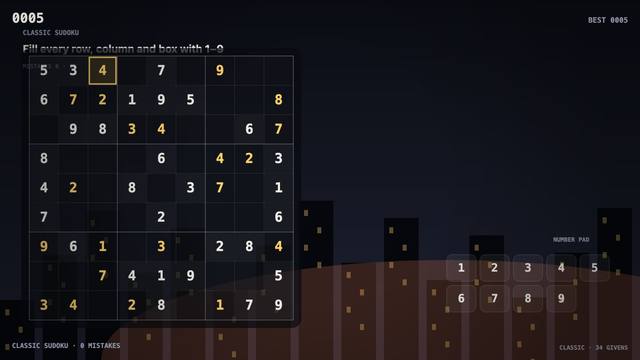
The six parts of a sudoku grid
Use these checks when the brief depends on a solvable grid and a clear input. They matter less for a story-led puzzle or a timed arcade game.
A grid with visible boxes
Rows, columns and boxes need different weights. If the box boundaries disappear, the rule becomes a guess.
Givens that anchor the solve
The starting numbers should be enough to make the first move without a hint. Too few givens turn the grid into a guessing game.
An input that fits the grid
Select a cell, then a number. The same flow should work with a mouse, a finger and the keyboard; a number pad that hides the grid is a layout bug.
A mistake you can see
A wrong number should be marked, not silently accepted. The mistake counter is the only feedback that separates a solve from a fill.
A size that changes the solve
4x4 teaches the rule; 6x6 adds boxes; 9x9 adds endurance. The mode should change the constraint, not just the pixel size.
A solved state
When the last cell is correct, the grid should stop and say so. A silent completion leaves the player checking an already-finished board.
The full sudoku shelf
Browse all Sudoku matches →| Build | Genre | Input |
|---|---|---|
| Mini Sudoku | sudoku | mouse or touch |
| Sudoku Six | sudoku | mouse or touch |
| Sudoku Classic | sudoku | mouse or touch |
Swipe the table to see input.
Where this shelf stops
- Scoping a sudoku grid with visible boxes and a cell-plus-number input.
- Choosing between a warm-up size and the classic 9x9 before adding a theme.
- Checking whether mistakes and completion are visible without a manual.
- Generating endless puzzles at multiple difficulty levels; the 9x9 build uses one fixed puzzle.
- Pencil notes, hint systems, undo history or a timer.
- Claiming a mobile-first layout when the grid is a fixed landscape board.
- Three sudoku builds across 4x4, 6x6 and 9x9.
- A number pad, a mistake counter and a solved state.
- One fixed 9x9 puzzle, not a puzzle generator.
What a sudoku tool page promises
Tool pages sell an endless puzzle feed and a difficulty slider. This shelf sells three grids you can open now, with one fixed classic puzzle and a visible mistake counter.
| Part | Tool pages promise | What this shelf gives you |
|---|---|---|
| Puzzle supply | Endless generated puzzles and daily challenges. | Three fixed builds; the 9x9 grid is one puzzle, not a generator. |
| Difficulty | Easy through expert, with a slider. | Size is the difficulty: 4x4, 6x6, 9x9. |
| Notes | Pencil marks and candidate highlighting. | No pencil notes or candidate display. |
| Hints | A hint button or step-by-step solver. | No hints. The mistake counter is the only feedback. |
Swipe the table to read all three columns.
How matching works
The matcher starts with “sudoku” and returns the closest playable build on this shelf. Read the matching method → Not sure which shelf fits?Open the genre map →
Three grids, three constraints
Start with the rule
Mini Sudoku is the smallest grid in the set. Use it to check whether the box boundaries and the number input are readable before the 9x9 grid adds endurance.
Play the build →Then test the classic
The 9x9 build is one fixed puzzle with a mistake counter. It is the honest test of whether the interface survives a longer solve.
Play the build →Sudoku questions
Are these generated sudoku puzzles?
The 4x4 and 6x6 grids are generated; the classic 9x9 build uses one fixed puzzle. There is no endless puzzle feed or daily challenge. A sudoku game generator would need an endless feed; this shelf has one fixed 9x9 puzzle.
Do the games have pencil notes?
No. You select a cell and place a number. There are no candidate marks, highlighting or undo history. There is no candidate mode, no highlight and no undo, so every placement is a commitment. The 4x4 warm-up is the place to feel that.
What happens when I make a mistake?
The build marks the wrong number and counts the mistake. It does not silently accept a bad cell. The cell turns red and the mistake count rises; the grid does not auto-correct or hide the error. You can keep playing after it.
Can I use a keyboard?
Yes. You can select a cell with the pointer and type a number; touch and mouse input use the on-screen number pad. Number keys place a value in the selected cell, and the arrow keys move the selection without the mouse.
Can I play on a phone?
The grid accepts touch, but the layout is a fixed landscape board. A narrow phone will crop rather than reflow the grid. The number pad is touch-friendly, but the grid is fixed landscape and will crop in portrait. The 4x4 grid fits best.
Why only three games?
Three sizes are enough to compare the rule, the boxes and the input. The page stays noindex until a fourth sudoku build is added. Three sizes are enough to decide what you would ask for when you make a sudoku game with AI.
Sources and definitions
- Wikipedia: SudokuGrid rules and box conventions.
- Wikipedia: Mathematics of SudokuConstraint and puzzle context.